
Description
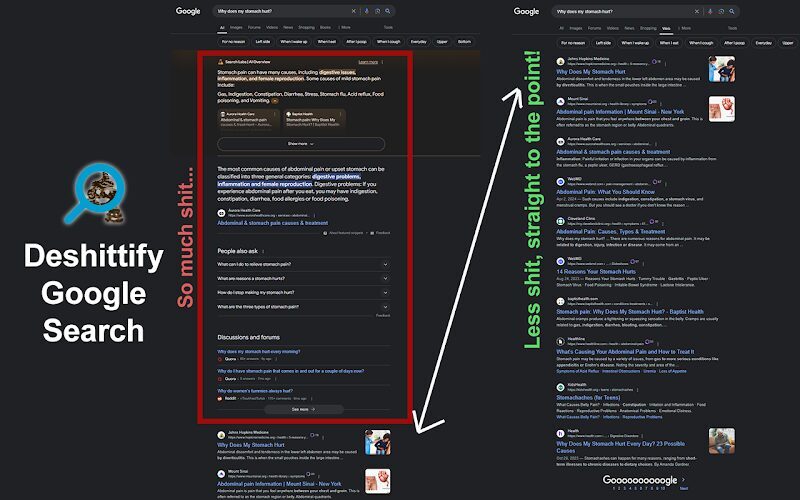
Have you ever heard the word “enshittification”? It refers to the strategy of incrementally degrading a product or service over time to reduce costs to increase profit. Google Search is one such example by applying sponsored ads, AI summaries, and other unnecessary bloat when you’re trying to quickly find information.
This free Google Chrome browser extension works to deshittify Google Search, effectively forcing the “web” filter to be applied when normally the “All” tab is used. It will not affect other search filters such as images, videos, news, books, shopping, forums, maps, flights, or finance.
The web filter clears the clutter that is the automatically generated AI summaries and rich results like product ads, video clips, FAQ dropdowns (“People also ask”), sidebar stuff, and more. All you’ll get are the web results you asked for.
Compatible with other country codes like google.de, google.cn, google.co.uk, etc.
Compatible with Google MyBusiness and Google reviews.
Opera users: this extension works with the Opera browser, but there is an additional step needed to enable it after installing it. Right click the extension icon and select “Manage extension”. On this page, scroll down to the setting “Allow access to search page results” and toggle it so that it is enabled. This setting is disabled by default.
Tech speak: automatically appends the udm=14 parameter to the end of your search query only when the filter is set to “all.” JavaScript is also used to visually remove the Sponsored search results at the top and bottom of the page.
Changelog
Version 1.3.0 – Published to Google Chrome Webstore on February 25, 2025
- The “Sponsored” search results visible at the top and/or bottom of the “Web” tab are now hidden, further deshittifying the Google search experience.
Version 1.2.0 – Published to Google Chrome Webstore on September 23, 2024
- Added a popup so when clicked, you can easily disable/enable the functionality.
- Added an additional check for the “stick” parameter to avoid conflicting with Google My Business and Google reviews.
Version 1.0.0 – Published to Google Chrome Webstore on August 6, 2024
- First release!
Note: the “release” dates listed in the description of the Google Chrome Web Store’s listing are when I upload the updated files. They go through a review process before they are automatically published (about three days). The “publish” dates listed here are the dates it is approved and becomes publicly available in the Web Store.
 Buy me a Coffee



Reviews
There are no reviews yet.