Do you manage a WordPress multisite installation? Does each site have different plugins active? Have you accidentally deleted a plugin that a subsite was using?? If you answered yes to any of these questions, then let’s upgrade the admin network plugins page to show you which site each plugin is installed on!
Are you a WordPress developer? Skip the explanation and go straight to the final code snippet. You got this.
When you view your list of plugins as a network manager, you only have three (3) columns: plugin, description, and automatic updates.
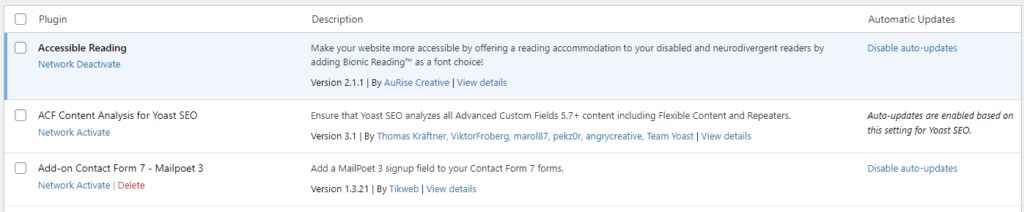
In single WordPress installs, you can’t accidentally delete a plugin without first deactivating it because there isn’t a delete button, instead, it just shows deactivate. However, in multisite WordPress installs, it will show the delete button even if it’s being used by a subsite. In this tutorial, I’ll show you how to add a custom column to the network plugins page to simply list out it’s status among the subsites. We’ll turn the screenshot above into the screenshot below.
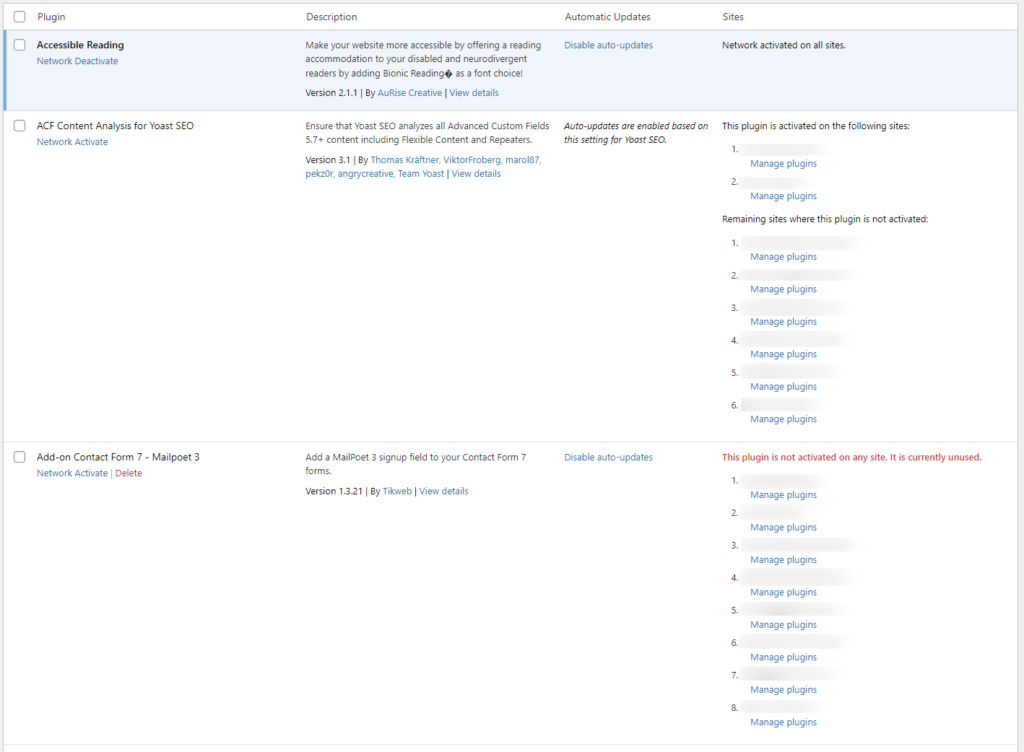
I’m only using four (4) functions: one to detect when the network admin is viewing the plugins screen and initializes it, one to add a little CSS so the column isn’t squished, one to add the custom column, and one to render the contents of the custom column. Let’s start backwards.
Add CSS to Network Plugins Page
This function adds some inline CSS to the page using a trick where we register a script with an empty source, enqueue it, and then we add it. This CSS is simply setting a minimum width for our custom column so it doesn’t appear too squished.
/**
 * Add CSS to Network Plugins Page
 *
 * @return void
 */
function aurise_multisite_css()
{
    wp_register_style(
        'aurise-plugins-table', // Handle
        '', // Source
        array(), // Dependencies
        null // Version
    );
    wp_enqueue_style('aurise-plugins-table');
    wp_add_inline_style('aurise-plugins-table', 'table.plugins tbody#the-list tr td.aurise_sites{min-width:200px}@media(min-width:768px){table.plugins tbody#the-list tr td.aurise_sites{min-width:400px}}');
}
Now you’ll notice this is just the function, nothing is calling it so it’s not doing anything… yet!
Add Custom Column to Network Plugins Table
This function is by far the easiest. The one and only parameter is an associative array where the keys are the column names and the value is the column’s pretty label. Simply add your custom column by merging it with the existing columns and return it!
/**
 * Add Custom Column to Network Plugins Table
 *
 * @param array $columns The current list of table columns.
 *
 * @return array The filtered list of table columns.
 */
function aurise_multisite_columns($columns)
{
    return array_merge($columns, array(
        'aurise_sites' => __('Sites', 'aurise')
    ));
}
Just like the previous snippet, nothing is calling this function yet. However, note that our column name aurise_sites is also used in the previous CSS snippet. It will be used again in the next snippet too.
Custom Column Callback for Network Plugins Table
This is where the fun is! First, let’s take a look at our function’s parameters:
/**
 * Render Custom Column Content for Network Plugins Table
 *
 * @param string $column The name of the column being rendered.
 * @param string $plugin The plugin name.
 *
 * @return void
 */
function aurise_multisite_column($column_name, $plugin)
{
    // Will do something awesome!
}
This function takes two parameters, the column name and plugin. Since we want to ensure we are only putting out content for our custom column, let’s validate the column name like this:
if ($column_name != 'aurise_sites') {
    return; // Bail
}
In that snippet, we’re comparing the $column_name variable to our custom column name aurise_sites from the previous snippets. If this isn’t our column, we return nothing to bail out of the function.
The next thing we can do is easily check if the plugin has been activated network wide, that way we don’t have to loop all the sites since we know a network activated plugin is active on every site in the network. For this, we’ll use the is_plugin_active_for_network() function, and simply return text that says so if it is.
// Check if this plugin has been network activated
if (is_plugin_active_for_network($plugin)) {
    esc_html_e('Network activated on all sites.', 'aurise');
    return;
}
If the if-statement evaluates to true, it translates/escapes/echo’s the text and then the nifty return; is there again to bail out of the rest of the function.
Next, we’re going to loop through each of our sites and figure out if the plugin is active on it or not! Here is the basic loop using WordPress functions get_sites(), switch_to_blog(), and restore_current_blog().
// Get list of site IDs
$sites = get_sites(array('fields' => 'ids'));

// Loop all sites
foreach ($sites as $site_id) {
    switch_to_blog($site_id); // Switch to this site

    // Do stuff

    restore_current_blog(); // Reverse the switch
}
The only function we really need here is is_plugin_active() to tell us whether or not the plugin is active on that site. We’ll do something if it is, and something else if it isn’t.
So in the stuff that we’ll be doing, we’re going to create two lists and if it’s active, add it to that list, and if it’s inactive, add it to the other. Because it’s eventually going to output it in an ordered list, and with a nice “Manage plugins” link that will take you to that subsite’s plugins page, this is what that looks like:
if (is_plugin_active($plugin)) {
    $active[] = sprintf(
        '<li>%s<br><a href="%s" style="margin-left:1em">%s</a></li>',
        esc_html($site_name),
        esc_url(admin_url('plugins.php')),
        esc_html__('Manage plugins', 'aurise')
    );
} else {
    $inactive[] = sprintf(
        '<li>%s<br><a href="%s" style="margin-left:1em">%s</a></li>',
        esc_html($site_name),
        esc_url(admin_url('plugins.php')),
        esc_html__('Manage plugins', 'aurise')
    );
}
It’s important to always use the proper escaping functions!
Another thing to consider is how we want the $site_name variable to display, and I have this change depending on the network’s subdomain install settings. If the subsites are configured to use subdomains, then simply show that, however, if it’s configured to use subdirectories, then let’s just get that instead of repeating the domain on every page. In this bit, I’m using the is_subdomain_install() function instead of checking for the SUBDOMAIN_INSTALL constant directly.
$subdomains = is_subdomain_install();

// Loop all sites
foreach ($sites as $site_id) {
    switch_to_blog($site_id); // Switch to this site

    if ($subdomains) {
        // Show me the (sub)domain
        $site_name = trim(sanitize_text_field(wp_parse_url($site_url, PHP_URL_HOST)));
    } else {
        // Show me the directory
        $site_name = trim(sanitize_text_field(wp_parse_url($site_url, PHP_URL_PATH)));
        if ($site_name === '/' || empty($site_name)) {
            $site_name =  trim(sanitize_text_field(wp_parse_url(network_site_url(), PHP_URL_HOST)));
        }
    }

...
For the primary site in a network install that uses subdirectories, we fall back to using the domain!
The last part of this function is to output these lists like so:
if (!count($active)) {
    echo (wp_kses_post(sprintf(
        '<strong style="color:#d63638">%s</strong><ol>%s</ol>',
        esc_html__('This plugin is not activated on any site. It is currently unused.', 'aurise'),
        implode('', $inactive)
    )));
    return;
}
echo (wp_kses_post(sprintf(
    '%s<ol>%s</ol>%s<ol>%s</ol>',
    esc_html__('This plugin is activated on the following sites:', 'aurise'),
    implode('', $active),
    esc_html__('Remaining sites where this plugin is not activated:', 'aurise'),
    implode('', $inactive)
)));
There isn’t anything fancy here, it just checks to see how many items are in the $active array and if there are none, then it shows that empty state. Otherwise, we get to see which ones are active vs inactive. Because of the simple HTML, it’s safe to escape it all with wp_kses_post().
To put that entire function together, it’d look like this:
/**
 * Render Custom Column Content for Network Plugins Table
 *
 * @param string $column The name of the column being rendered.
 * @param string $plugin The plugin name.
 *
 * @return void
 */
function aurise_multisite_column($column_name, $plugin)
{
    if ($column_name != 'aurise_sites') {
        return; // Bail
    }
    // Check if this plugin has been network activated
    if (is_plugin_active_for_network($plugin)) {
        esc_html_e('Network activated on all sites.', 'aurise');
        return;
    }
    // Loop through all the sites to see where it's active and where it isn't
    $active = array();
    $inactive = array();
    $sites = get_sites(array('fields' => 'ids'));
    $subdomains = is_subdomain_install();
    foreach ($sites as $site_id) {
        switch_to_blog($site_id);
        $site_url = get_bloginfo('url');
        if ($subdomains) {
            $site_name = trim(sanitize_text_field(wp_parse_url($site_url, PHP_URL_HOST)));
        } else {
            $site_name = trim(sanitize_text_field(wp_parse_url($site_url, PHP_URL_PATH)));
            if ($site_name === '/' || empty($site_name)) {
                $site_name =  trim(sanitize_text_field(wp_parse_url(network_site_url(), PHP_URL_HOST)));
            }
        }
        if (is_plugin_active($plugin)) {
            $active[] = sprintf(
                '<li>%s<br><a href="%s" style="margin-left:1em">%s</a></li>',
                esc_html($site_name),
                esc_url(admin_url('plugins.php')),
                esc_html__('Manage plugins', 'aurise')
            );
        } else {
            $inactive[] = sprintf(
                '<li>%s<br><a href="%s" style="margin-left:1em">%s</a></li>',
                esc_html($site_name),
                esc_url(admin_url('plugins.php')),
                esc_html__('Manage plugins', 'aurise')
            );
        }
        restore_current_blog();
    }
    if (!count($active)) {
        echo (wp_kses_post(sprintf(
            '<strong style="color:#d63638">%s</strong><ol>%s</ol>',
            esc_html__('This plugin is not activated on any site. It is currently unused.', 'aurise'),
            implode('', $inactive)
        )));
        return;
    }
    echo (wp_kses_post(sprintf(
        '%s<ol>%s</ol>%s<ol>%s</ol>',
        esc_html__('This plugin is activated on the following sites:', 'aurise'),
        implode('', $active),
        esc_html__('Remaining sites where this plugin is not activated:', 'aurise'),
        implode('', $inactive)
    )));
}
And just like the rest, we haven’t called it yet. That’ll be in the next and final step.
Initialise Network Plugin Customizations
For this function, we’re going to hook everything into the init action hook first so that just about everything we need to check and validate will be available. This function will determine when and for whom these customizations should show for. Specifically, we’ll check for:
- That the current user is logged in and has the
manage_network_pluginscapability - That we’re viewing the network plugins page of the wordpress backend, not just any plugins page (e.g. that the URL is
https://example.com/wp-admin/network/plugins.phpinstead ofhttps://example.com/wp-admin/plugins.php) - That this is for a multisite installation (should’ve been obvious, but even if you accidentally add this code to a single site install, we don’t want it to cause problems).
if (is_admin() && is_multisite()) {
    /**
     * Initialise Network Plugins Customizations
     *
     * @return void
     */
    function aurise_multisite_plugin_management()
    {
        // Viewing network plugins page
        if (
            current_user_can('manage_network_plugins') &&
            count($path = explode('/', sanitize_text_field(trim($_SERVER['REQUEST_URI'], ' /')))) === 3 &&
            $path[0] == 'wp-admin' && $path[1] == 'network' && strpos($path[2], 'plugins.php') === 0
        ) {
            // Do stuff
        }
    }
    add_action('init', 'aurise_multisite_plugin_management', 1);
}
After we validate those, we’ll hook into these filters and actions to initialize the three (3) functions we wrote already:
- The
admin_enqueue_scriptsaction to add our CSS - The
manage_{$screen_id}_columnsfilter to add our custom column - The
manage_{$screen_id}_custom_columnaction to hook our custom column’s callback function
I could not find the official documentation for the plugins and network plugins page regarding those last two, but it works when the $screen_id for the first one is plugins-network and the second one is plugins, so the hooks are manage_plugins-network_columns and manage_plugins_custom_column respectively. They are similar to the manage_pages_columns / manage_pages_custom_columns hooks for pages, manage_posts_columns / manage_posts_custom_column for posts, and manage_{$post_type}_posts_columns / manage_{$post_type}_posts_custom_column for any post type, including custom post types. So the inside of this if-statement looks like this:
// Add inline CSS
add_action('admin_enqueue_scripts',  'aurise_multisite_css');

// Define additional admin column
$screen_id = 'plugins-network';
add_filter("manage_{$screen_id}_columns", 'aurise_multisite_columns');

// Define callback function for custom admin column
$screen_id = 'plugins';
add_action("manage_{$screen_id}_custom_column", 'aurise_multisite_column', 10, 2);
You don’t need the $screen_id variable, I just left it in there while trying to figure out what worked, you could absolutely leave it hardcoded like so:
// Add inline CSS
add_action('admin_enqueue_scripts',  'aurise_multisite_css');

// Define additional admin column
add_filter("manage_plugins-network_columns", 'aurise_multisite_columns');

// Define callback function for custom admin column
add_action("manage_plugins_custom_column", 'aurise_multisite_column', 10, 2);
Completed Code Snippet
And voila! When completed, this is what our code snippet would look like. Just stick it in your child theme or add it via a plugin. Personally, I’ve added it into my own “must have” plugin.
if (is_admin() && is_multisite()) {

    /**
     * Add Custom Column to Network Plugins Table
     *
     * @param array $columns The current list of table columns.
     *
     * @return array The filtered list of table columns.
     */
    function aurise_multisite_columns($columns)
    {
        return array_merge($columns, array(
            'aurise_sites' => __('Sites', 'aurise')
        ));
    }

    /**
     * Render Custom Column Content for Network Plugins Table
     *
     * @param string $column The name of the column being rendered.
     * @param string $plugin The plugin name.
     *
     * @return void
     */
    function aurise_multisite_column($column_name, $plugin)
    {
        if ($column_name != 'aurise_sites') {
            return; // Bail
        }
        // Check if this plugin has been network activated
        if (is_plugin_active_for_network($plugin)) {
            esc_html_e('Network activated on all sites.', 'aurise');
            return;
        }
        // Loop through all the sites to see where it's active and where it isn't
        $active = array();
        $inactive = array();
        $sites = get_sites(array('fields' => 'ids'));
        $subdomains = is_subdomain_install();
        foreach ($sites as $site_id) {
            switch_to_blog($site_id);
            $site_url = get_bloginfo('url');
            if ($subdomains) {
                $site_name = trim(sanitize_text_field(wp_parse_url($site_url, PHP_URL_HOST)));
            } else {
                $site_name = trim(sanitize_text_field(wp_parse_url($site_url, PHP_URL_PATH)));
                if ($site_name === '/' || empty($site_name)) {
                    $site_name =  trim(sanitize_text_field(wp_parse_url(network_site_url(), PHP_URL_HOST)));
                }
            }
            if (is_plugin_active($plugin)) {
                $active[] = sprintf(
                    '<li>%s<br><a href="%s" style="margin-left:1em">%s</a></li>',
                    esc_html($site_name),
                    esc_url(admin_url('plugins.php')),
                    esc_html__('Manage plugins', 'aurise')
                );
            } else {
                $inactive[] = sprintf(
                    '<li>%s<br><a href="%s" style="margin-left:1em">%s</a></li>',
                    esc_html($site_name),
                    esc_url(admin_url('plugins.php')),
                    esc_html__('Manage plugins', 'aurise')
                );
            }
            restore_current_blog();
        }
        if (!count($active)) {
            echo (wp_kses_post(sprintf(
                '<strong style="color:#d63638">%s</strong><ol>%s</ol>',
                esc_html__('This plugin is not activated on any site. It is currently unused.', 'aurise'),
                implode('', $inactive)
            )));
            return;
        }
        echo (wp_kses_post(sprintf(
            '%s<ol>%s</ol>%s<ol>%s</ol>',
            esc_html__('This plugin is activated on the following sites:', 'aurise'),
            implode('', $active),
            esc_html__('Remaining sites where this plugin is not activated:', 'aurise'),
            implode('', $inactive)
        )));
    }

    /**
     * Add CSS to Network Plugins Page
     *
     * @return void
     */
    function aurise_multisite_css()
    {
        wp_register_style(
            'aurise-plugins-table', // Handle
            '', // Source
            array(), // Dependencies
            null // Version
        );
        wp_enqueue_style('aurise-plugins-table');
        wp_add_inline_style('aurise-plugins-table', 'table.plugins tbody#the-list tr td.aurise_sites{min-width:200px}@media(min-width:768px){table.plugins tbody#the-list tr td.aurise_sites{min-width:400px}}');
    }

    /**
     * Initialise Network Plugins Customizations
     *
     * @return void
     */
    function aurise_multisite_plugin_management()
    {
        // Viewing network plugins page
        if (
            current_user_can('manage_network_plugins') &&
            count($path = explode('/', sanitize_text_field(trim($_SERVER['REQUEST_URI'], ' /')))) === 3 &&
            $path[0] == 'wp-admin' && $path[1] == 'network' && strpos($path[2], 'plugins.php') === 0
        ) {
            add_action('admin_enqueue_scripts',  'aurise_multisite_css');

            $screen_id = 'plugins-network';
            add_filter("manage_{$screen_id}_columns", 'aurise_multisite_columns'); // Define additional admin columns on archive page

            $screen_id = 'plugins';
            add_action("manage_{$screen_id}_custom_column", 'aurise_multisite_column', 10, 2); // Callback function for custom admin columns on archive page
        }
    }
    add_action('init', 'aurise_multisite_plugin_management', 1);
}