Description
Spammers are getting smarter, but that’s okay, because so are we! They’re abusing a loophole in Google’s Mail Daemon system where they intentionally send email to a nonexistent email but the bounce-back email that Google automatically sends back, attaching their original spammy content, gets sent to you instead! That way, their links and tracking pixels get through to you without being blocked since the email you receive originates from [email protected]
Please allow me to introduce you to my free Google Apps script, Gmail Spam Control. It is an automation that runs every 5 minutes to identify these types of emails and toss them into your trash bin. My script is intentionally written to not permanently delete emails, so if there are any mis-identified emails, you can catch them (and then please let me know).
Please note that this script only works for Gmail, i.e. the email account you manage with Google (including business emails hosted on Google). This will not work for email accounts hosted with Yahoo, Outlook, or any other email service provider.
Share this on:
Installation Instructions
- Click the “Start now for FREE” button to view the script page at
script.google.com
- If you’re not logged into Google, login now. If you are logged in, make sure you’re using the account you want (if you have more than one) the script to work on by clicking on your profile image on the top right
- Along the top bar, check that the select function to run dropdown is Authorize.
- Click the button that says Run to run the authorization function. This will bring up prompts to allow my script to access your email account. It will say that the script is not verified by Google (because it’s not) and to only authorize if you trust the developer. I’m not saying to blindly trust me, but you can see for yourself my comments all throughout the script along with documentation that I’m not doing anything nefarious there. If you feel confident that I’m not going to steal information, then go ahead and use my script. To further explain the three permission scopes my script is requesting:
- See your profile info: Email Address
This is requested because this script uses your email address to compare against email headers found in these types of spam emails.
- Read, compose, send, and permanently delete all your email from Gmail
This is requested so the script can search your email for the Mail Daemon notices, parse email headers to identify the patterns that these spammers are using, adds a custom label named zzzCheckedByAuRiseDaemonSpamChecker to avoid duplicate checks in subsequent queries, and send the emails that match the spammer’s patterns to your trash folder. This script does not permanently delete any of your emails.
- Allow this application to run when you are not present.
This is requested so the script can run every 5 minutes to continuously check for the spam emails.
- Once authorization is successful, change the select function to run dropdown to Install, and click the Run button again. This will start the automation with the first one starting in about 2-ish minutes.
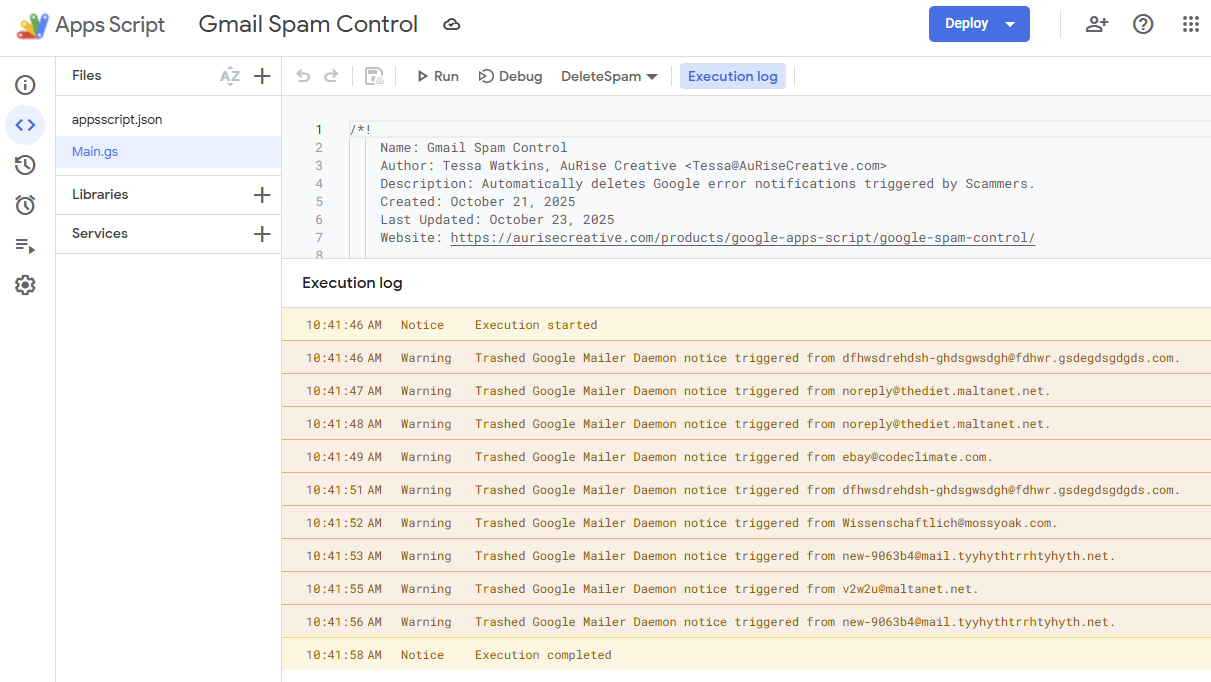
- Optional: change the select function to run dropdown to DeleteSpam to run the script immediately if you don’t want to wait for it’s next scheduled time. You can also skip installation and choose to run the script manually whenever you want to by running that function.
And that’s all! If you want to turn it off, just open the script again, choose Uninstall from the select function to run dropdown, and click Run to stop it from checking every 5 minutes. Alternatively, you can go to your account permissions page and revoke authorization from this script at any time.
Donate
This is a FREE product that I poured a little bit of my heart and soul into with the sole purpose of being helpful to you. Please help support my small business by donating! Donations assist in maintaining this product, my other free products, and my pro-bono projects by keeping me inspired and allowing me to set aside the time to work on these! Time is money after all!
 Buy me a Coffee





Reviews
There are no reviews yet.