Skip to content
Home ยป Documentation ยป Contact Form 7 – Dynamic Text Extension ยป Form Tags ยป Dynamic Phone Number

Dynamic Phone Number

Dynamic Tel is a form tag added by Contact Form 7 – Dynamic Text Extension (DTX) that creates <input type="tel"> form fields for forms created with Contact Form 7. These fields allow input for telephone numbers. It expands upon Contact Form 7’s telephone number form tag, accepting all of the options it does, along with these additional options introduced by DTX:

OptionDescriptionExample
Dynamic valueSet a dynamic default value. It can be static text or a shortcode. The value is shown in the form tag between quotes.[dynamic_tel inputname "CF7_get_current_user key='phone'"]
Cache CompatibleEnable cache compatibility mode for this field[dynamic_tel inputname dtx_pageload]
Options for the Dynamic Tel form tag for Contact Form 7 provided by DTX.

These settings are easily configurable using the form-tag generator.
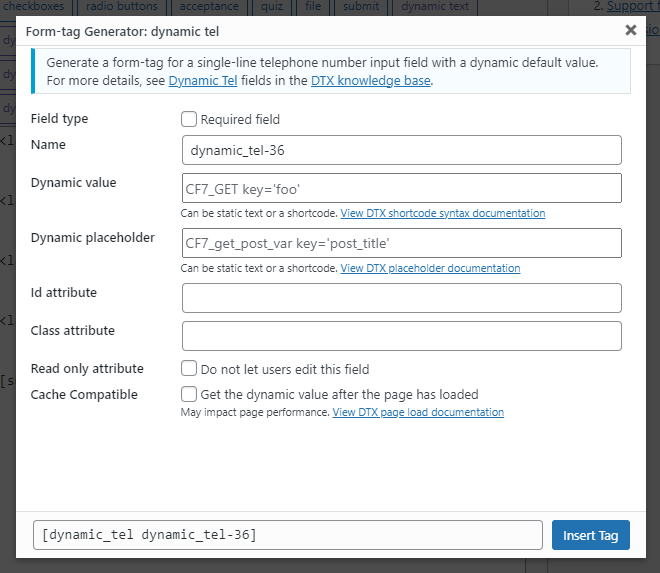
The form tag generator screen for the dynamic phone number (tel) form tag

The dynamic_tel form tag was introduced in version 4.0.0 of theย Contact Form 7 โ€“ Dynamic Text Extensionย WordPress plugin.

Related Post Module Attributes Before

array(29) {
  ["post_type"]=>
  string(4) "post"
  ["post_id"]=>
  string(1) "0"
  ["exclude"]=>
  string(1) "0"
  ["title"]=>
  string(32) "Related Articles & Tutorials"
  ["description"]=>
  string(0) ""
  ["max"]=>
  string(1) "3"
  ["post_ids"]=>
  string(0) ""
  ["exclude_ids"]=>
  string(0) ""
  ["is_series"]=>
  string(0) ""
  ["featured_term"]=>
  string(3) "307"
  ["exclude_terms"]=>
  string(0) ""
  ["exclusive"]=>
  string(1) "1"
  ["order"]=>
  string(4) "DESC"
  ["show_image"]=>
  string(2) "on"
  ["image_size"]=>
  string(6) "medium"
  ["menu_order_label"]=>
  string(0) ""
  ["show_order_label"]=>
  string(2) "on"
  ["show_date"]=>
  string(2) "on"
  ["show_meta_keys"]=>
  string(2) "on"
  ["show_modified"]=>
  string(0) ""
  ["show_author"]=>
  string(0) ""
  ["show_categories"]=>
  string(0) ""
  ["show_primary_category"]=>
  string(0) ""
  ["show_description"]=>
  string(0) ""
  ["show_reading_time"]=>
  string(2) "on"
  ["show_cta"]=>
  string(2) "on"
  ["cta"]=>
  string(9) "Read more"
  ["autoplay"]=>
  string(0) ""
  ["allow_sticky"]=>
  string(0) ""
}

Related Post Module Attributes

array(29) {
  ["post_type"]=>
  string(4) "post"
  ["post_id"]=>
  string(1) "0"
  ["exclude"]=>
  string(1) "0"
  ["title"]=>
  string(32) "Related Articles & Tutorials"
  ["description"]=>
  string(0) ""
  ["max"]=>
  string(1) "3"
  ["post_ids"]=>
  string(0) ""
  ["exclude_ids"]=>
  string(0) ""
  ["is_series"]=>
  string(0) ""
  ["featured_term"]=>
  string(3) "307"
  ["exclude_terms"]=>
  string(0) ""
  ["exclusive"]=>
  string(1) "1"
  ["order"]=>
  string(4) "DESC"
  ["show_image"]=>
  string(2) "on"
  ["image_size"]=>
  string(6) "medium"
  ["menu_order_label"]=>
  string(0) ""
  ["show_order_label"]=>
  string(2) "on"
  ["show_date"]=>
  string(2) "on"
  ["show_meta_keys"]=>
  string(2) "on"
  ["show_modified"]=>
  string(0) ""
  ["show_author"]=>
  string(0) ""
  ["show_categories"]=>
  string(0) ""
  ["show_primary_category"]=>
  string(0) ""
  ["show_description"]=>
  string(0) ""
  ["show_reading_time"]=>
  string(2) "on"
  ["show_cta"]=>
  string(2) "on"
  ["cta"]=>
  string(9) "Read more"
  ["autoplay"]=>
  string(0) ""
  ["allow_sticky"]=>
  string(0) ""
}
