Skip to content
Home » Documentation » Contact Form 7 – Dynamic Text Extension » Allow Access to Post Meta and User Data » Form Scanner

Form Scanner

The Form Scanner is a tool we designed to make it easy find and add keys to the allow list. Be sure to review each key to make sure you are not allowing access to sensitive data.

How it works

  • Scans all Contact Form 7 forms on your site
  • Checks for the use of the CF7_get_custom_field and CF7_get_current_user shortcodes
  • Detects any meta or user data keys that are used, which are disallowed by default
  • Provides a simple interface to select the keys you wish to allow and add them to the allow list

Please note, the scanner will not detect the use of DTX shortcodes or functions outside of forms built in Contact Form 7.

How to use

Step 1: Go to the DTX settings page

To use the Form Scanner, navigate to Contact > Dynamic Text Extension in the WordPress backend.
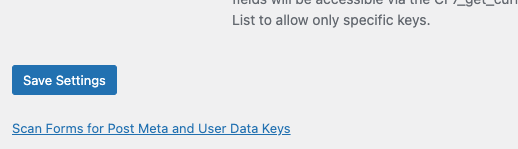
DTX Scan Button

Step 2: Perform the scan

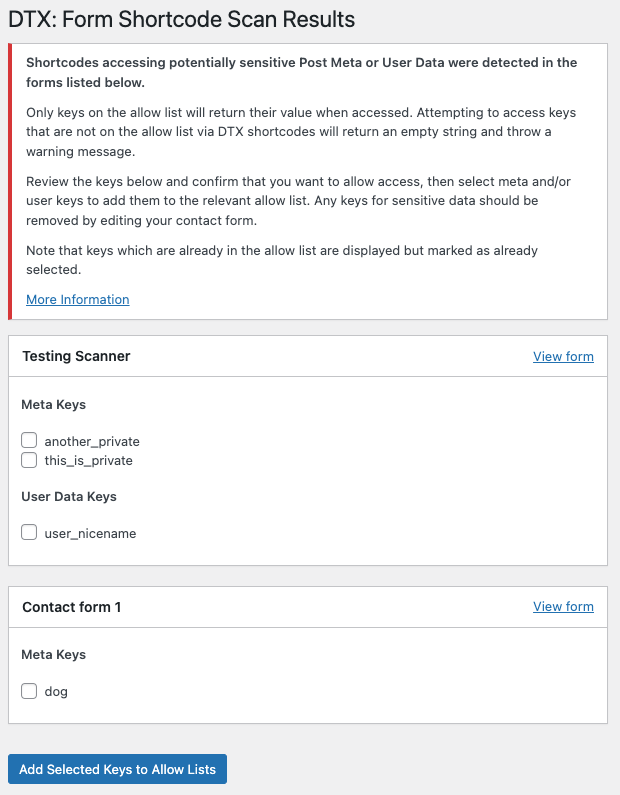
Scroll to the bottom and click Scan Forms for Post Meta and User Data Keys. A scan of your forms will be performed and the results will be displayed. For each form where disallowed keys are detected, Meta Keys and User Data Keys will be displayed:
Step 3: Review each key

  • For any keys you wish to allow, check the box beside them. Then click “Add Selected Keys to Allow Lists” to add all selected keys to the relevant lists, allowing access in the forms.
  • Keys that are already on the allow list will be displayed and checked by default, and cannot be selected.
  • For any keys you wish to disallow, edit the form and remove those keys and shortcodes from your dynamic form tags.

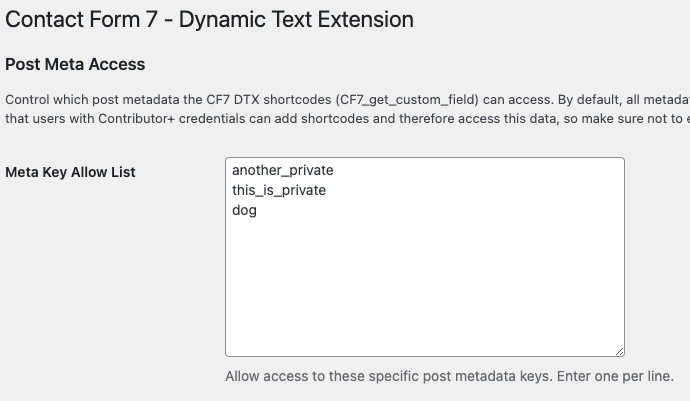
Your allowed keys will then appear in the Allow Lists in the settings.
Related Post Module Attributes Before

array(29) {
  ["post_type"]=>
  string(4) "post"
  ["post_id"]=>
  string(1) "0"
  ["exclude"]=>
  string(1) "0"
  ["title"]=>
  string(32) "Related Articles & Tutorials"
  ["description"]=>
  string(0) ""
  ["max"]=>
  string(1) "3"
  ["post_ids"]=>
  string(0) ""
  ["exclude_ids"]=>
  string(0) ""
  ["is_series"]=>
  string(0) ""
  ["featured_term"]=>
  string(3) "307"
  ["exclude_terms"]=>
  string(0) ""
  ["exclusive"]=>
  string(1) "1"
  ["order"]=>
  string(4) "DESC"
  ["show_image"]=>
  string(2) "on"
  ["image_size"]=>
  string(6) "medium"
  ["menu_order_label"]=>
  string(0) ""
  ["show_order_label"]=>
  string(2) "on"
  ["show_date"]=>
  string(2) "on"
  ["show_meta_keys"]=>
  string(2) "on"
  ["show_modified"]=>
  string(0) ""
  ["show_author"]=>
  string(0) ""
  ["show_categories"]=>
  string(0) ""
  ["show_primary_category"]=>
  string(0) ""
  ["show_description"]=>
  string(0) ""
  ["show_reading_time"]=>
  string(2) "on"
  ["show_cta"]=>
  string(2) "on"
  ["cta"]=>
  string(9) "Read more"
  ["autoplay"]=>
  string(0) ""
  ["allow_sticky"]=>
  string(0) ""
}

Related Post Module Attributes

array(29) {
  ["post_type"]=>
  string(4) "post"
  ["post_id"]=>
  string(1) "0"
  ["exclude"]=>
  string(1) "0"
  ["title"]=>
  string(32) "Related Articles & Tutorials"
  ["description"]=>
  string(0) ""
  ["max"]=>
  string(1) "3"
  ["post_ids"]=>
  string(0) ""
  ["exclude_ids"]=>
  string(0) ""
  ["is_series"]=>
  string(0) ""
  ["featured_term"]=>
  string(3) "307"
  ["exclude_terms"]=>
  string(0) ""
  ["exclusive"]=>
  string(1) "1"
  ["order"]=>
  string(4) "DESC"
  ["show_image"]=>
  string(2) "on"
  ["image_size"]=>
  string(6) "medium"
  ["menu_order_label"]=>
  string(0) ""
  ["show_order_label"]=>
  string(2) "on"
  ["show_date"]=>
  string(2) "on"
  ["show_meta_keys"]=>
  string(2) "on"
  ["show_modified"]=>
  string(0) ""
  ["show_author"]=>
  string(0) ""
  ["show_categories"]=>
  string(0) ""
  ["show_primary_category"]=>
  string(0) ""
  ["show_description"]=>
  string(0) ""
  ["show_reading_time"]=>
  string(2) "on"
  ["show_cta"]=>
  string(2) "on"
  ["cta"]=>
  string(9) "Read more"
  ["autoplay"]=>
  string(0) ""
  ["allow_sticky"]=>
  string(0) ""
}
